
When a hospital network fails, patient care can fail with it.
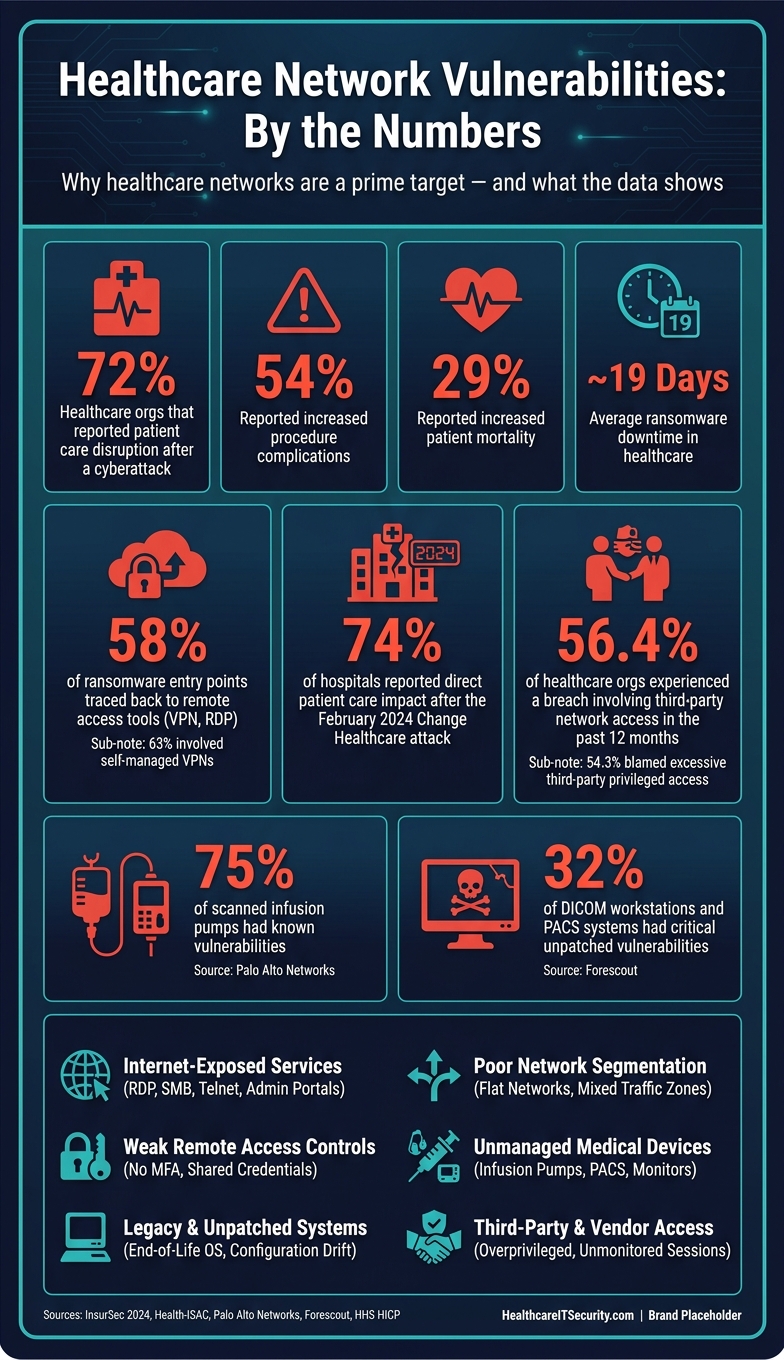
I’d sum up the risk like this: the biggest weak points in healthcare networks are internet-exposed services, weak remote access, old and unpatched systems, poor segmentation, unmanaged medical devices, and third-party vendor risk. These gaps can lead to downtime, data exposure, delayed treatment, medication mistakes, and long recovery periods.
A few numbers make the problem plain:
- 72% of healthcare groups hit by common cyberattacks said patient care was disrupted
- 54% reported more procedure complications
- 29% reported increased mortality
- Average ransomware downtime reached nearly 19 days
- After the February 2024 Change Healthcare attack, 74% of surveyed hospitals said patient care was directly affected
If I were reducing risk first, I’d focus on:
- Closing internet-facing RDP, SMB, Telnet, and admin portals
- Putting all remote access behind MFA
- Patching internet-facing and actively exploited flaws first
- Segmenting clinical, business, guest, and vendor traffic
- Restricting vendor access to named, time-limited accounts
- Finding and isolating old or unmanaged medical devices
This article explains where these network weak points show up in healthcare IT, why they hit hospitals harder than many other sectors, and what teams can do to lower risk without getting in the way of care.
Healthcare Cybersecurity Vulnerabilities: Key Stats & Risk Factors
Hack-Proofing Hospitals: The Government’s Plan to Stop Cyberattacks Before They Start
sbb-itb-535baee
Internet-Exposed Services and Weak Remote Access Controls
Remote access is one of the main ways attackers get into healthcare networks. A 2024 InsurSec report found that 58% of ransomware claims with a known entry point traced back to remote access tools like VPNs, RDP, and other internet-exposed systems.[6] Of those cases, 63% involved self-managed VPNs.[6] So this isn't a side issue. It's a common front door for attackers.
The services most often left exposed are RDP, VPNs, SMB, and admin panels that should never be reachable from the public internet.
Common Exposure Points: RDP, VPNs, SMB, Management Interfaces, and Legacy Protocols
RDP remains one of the most attacked services in healthcare. Since 2020, Health-ISAC has issued at least 79 remediation alerts for exposed RDP instances and keeps listing it among the top 10 attack vectors hitting the sector.[3] The playbook is simple: attackers scan for open RDP ports, then try password spraying or brute-force attacks until something works.
VPN gateways are another frequent weak spot. Attackers often go after older or poorly maintained VPN appliances, especially ones missing patches or running without MFA. Once they get through that layer, they may gain broad visibility into clinical systems, file servers, and EHR infrastructure. SMB, Telnet, SNMP, and web-based management consoles for firewalls, PACS systems, and medical device gateways add more risk. Internet-wide research has found all of these services exposed across healthcare organizations, along with expired or misconfigured TLS certificates.[7] In a lot of cases, the cause is painfully ordinary: rushed rollouts, default settings that were never changed, or temporary access left in place long after it should have been removed.
| Exposed Service | How Attackers Abuse It |
|---|---|
| RDP | Password spraying, brute force, known CVEs; direct path to interactive system access |
| VPN gateways | Stolen credentials, unpatched appliances, no MFA; broad lateral access once inside |
| SMB | Credential theft, shared-folder access, and lateral movement |
| Web management consoles | Default or weak passwords; automated scanning finds them quickly |
| Legacy protocols (Telnet, FTP) | Unencrypted credentials and patient data sent in cleartext |
How to Reduce Remote Access Risk Without Disrupting Clinical Operations
Do not expose RDP, SMB, Telnet, or admin consoles to the public internet.[2][4] Block RDP on port 3389 from internet access and allow connections only from approved sources. If remote desktop access is needed, put it behind a hardened VPN or a jump host with MFA.
Patch VPNs fast, and retire older appliances that can't support MFA or current encryption.[5] Every remote access path should require MFA. Push-based authenticator apps or FIDO2 keys can work well for clinical staff moving between units, while time-limited vendor accounts with MFA fit vendor access. Role-based access control should also keep each remote user in their lane. A biomedical vendor working on one imaging system shouldn't be able to roam across the rest of the network. It also helps to centralize logs from VPNs, remote access gateways, and identity providers in a SIEM so security teams can spot off-hours logins, unfamiliar locations, and odd vendor activity.
Even with these controls in place, remote access is only one piece of the attack surface. Unpatched systems and stale configurations create their own set of problems.
Legacy Systems, Missing Patches, and Configuration Drift
In healthcare, unpatched systems often stick around for a simple reason: updating them can risk downtime, disrupt workflows, or interfere with patient care. That puts security teams in a bind. In network terms, every system left behind adds more paths an attacker can scan, exploit, and use to move deeper into the environment.
Why Unpatched Clinical Systems and Default Configurations Persist
The hardest systems to patch are often the ones tied most closely to care. That includes Windows-based imaging workstations, older laboratory analyzers, radiology systems, and servers that support EHR integrations. Many of these run on operating systems vendors no longer certify for updates. Others can't handle current software unless the hardware is replaced outright.
A well-known example is the May 2017 UK National Health Service disruption caused by WannaCry. Attackers used SMBv1/EternalBlue on legacy Windows systems that were still unpatched or no longer supported. The attack led to more than 19,000 canceled appointments and an estimated £92 million in losses.[10][11][12]
The issue doesn't stop at missing OS patches. Configuration drift makes things worse. One location disables legacy protocols, while another leaves them on. One department locks down firewall rules, while another keeps access broad. Bit by bit, the environment starts to fray.
Over time, several problems tend to pile up:
- Unused service accounts stay active
- Default credentials never get changed
- Outdated cipher suites remain enabled
- Firewall exceptions from short-term projects stay in place
That leaves the network with an uneven security baseline. And attackers don't need every door open. They just need the weakest one.
Asset Inventory, Patch Prioritization, and Compensating Controls
A current asset inventory is where this starts. It should record each device's OS or firmware version, software dependencies, owner, network zone, support status, and clinical function. That matters because an unsupported imaging workstation and a general IT laptop may both be old, but they don't carry the same remediation limits. HHS guidance says asset inventories should be reviewed and updated at least once a year and whenever major changes hit the environment.[9]
When patching everything at once isn't possible - and in healthcare, it rarely is - teams need to work by risk. Internet-facing systems and flaws with known active exploitation should come first. After that, focus on systems that store or transmit PHI, support direct patient care, or could help an attacker move laterally.
If patching has to wait, the next move is to reduce exposure. Put the system on a restricted VLAN, tighten firewall rules so only needed traffic gets through, disable unused accounts and services, and send administrative access through a jump host. Every exception should be documented with a named risk owner, a compensating control, and a target remediation or retirement date. Otherwise, "temporary" has a way of turning into "still here three years later."
| Scenario | Recommended Response |
|---|---|
| Internet-facing, actively exploited vulnerability | Patch immediately or isolate with compensating controls[13][8] |
| Legacy clinical device with vendor patch delay | Segment, restrict access, apply compensating controls, document residual risk[8][14] |
| Unsupported OS or end-of-life platform | Replace or retire; if not feasible, isolate tightly and monitor continuously[8] |
These steps cut exposure, but they don't stop an attacker who gets in with valid access and starts moving across the network.
Weak Access Controls, Poor Segmentation, and Third-Party Network Risk
Patching and configuration gaps create openings. But weak access controls and poor segmentation are what let an attacker turn a small entry point into a clinical-system compromise or ePHI exposure. Once they get in, a flat network and over-privileged accounts can let them move from a business workstation into clinical systems with far less resistance than there should be.
Identity and Segmentation Gaps That Enable Lateral Movement
Shared admin accounts are still common in healthcare. That creates a simple but serious problem: it's hard to tell who did what, hard to enforce accountability, and risky when someone leaves the organization. The same issue shows up in kiosk logins and in legacy EHR or PACS admin accounts. Over-permissive break-glass emergency access can open one more path for privilege escalation and lateral movement.[19]
Missing MFA on privileged accounts makes the situation worse. A single stolen credential can expose sensitive systems. HICP Technical Volume 2 guidance calls for MFA on all privileged accounts and remote access protocols. It also calls for brokered access to admin accounts and regular reviews of privileged access.[1][15]
Flat or weakly segmented networks make every one of these problems hit harder. If clinical, administrative, guest, and vendor-facing traffic all sit in the same network space, one compromised endpoint can more easily reach systems that store or process ePHI. Good segmentation limits east-west traffic by protocol, service, port, and IP. It also keeps management interfaces out of production zones.[20] And when vendors have broad access to clinical systems, weak segmentation becomes even more dangerous.
How to Control Vendor and Third-Party Access More Safely
Third-party access is where many of these issues collide. In one survey of 209 healthcare respondents, 56.4% of healthcare delivery organizations reported a breach involving a third party accessing their network in the previous 12 months, and 54.3% believed the breach was caused by third parties having too much privileged access.[16][17] The same research found that only 51.1% reported having a comprehensive inventory of all third parties accessing their network.[16][21]
A safer setup is pretty straightforward:
- Give every vendor a named account tied to one person, not a shared team login
- Limit access to the exact devices or applications that vendor needs
- Make sessions time-bound
- Require MFA for all vendor logins
- Use a privileged access management solution to control privilege elevation, not just sign-in[1][15][18]
Vendor connections should also pass through dedicated segments, such as a vendor DMZ or isolated VLAN, instead of landing straight inside the production network.
Using Censinet RiskOps to Strengthen Risk Governance
One study found that healthcare systems average 181 authorized vendors with network access, and 60% of organizations said third-party access to sensitive information is not routinely monitored.[18][21] Censinet RiskOps™ brings third-party and enterprise risk assessments, cybersecurity benchmarking, and collaborative risk management into one place across PHI, clinical applications, medical devices, and supply chain risk. The same discipline should extend to unmanaged medical devices and wireless systems.
Unmanaged Medical Devices and a Practical Healthcare Network Risk Program
Medical IoT and Wireless Weaknesses That Security Teams Often Miss
Even after you lock down vendor access, unmanaged devices can still leave the network exposed.
Infusion pumps, imaging systems, and bedside monitors often ship with weak default settings and open traffic paths. That’s not a small issue. Forescout found critical unpatched vulnerabilities in 32% of DICOM workstations and PACS systems and 26% of pump controllers. Palo Alto Networks found known vulnerabilities in 75% of scanned infusion pumps.[27][29] When these devices are weak, the impact hits core care systems fast, from medication delivery to patient monitoring to imaging uptime.
Wireless and Bluetooth-enabled devices add another layer of risk. Some store Wi-Fi credentials in plaintext or rely on weak Bluetooth Low Energy settings. That can let attackers steal credentials or use the device as a stepping stone into the rest of the network.[28][24] And in many hospitals, ownership is split across IT, security, and biomedical engineering, so no one group fully owns the problem.[27][31]
That’s why periodic spot checks aren’t enough. These gaps call for continuous discovery and steady remediation.
Building a Repeatable Assessment and Remediation Program
A practical program starts with continuous discovery, advisory-driven assessment, and risk-based fixes.[25][26][30] Censinet RiskOps™ supports this kind of program by centralizing assessment workflows, enabling cybersecurity benchmarking, and supporting collaborative risk management across medical devices, PHI, and supply chain risk.
Once devices are identified, segment them by function and risk. Put infusion pumps, PACS, and bedside monitors on dedicated VLANs, apart from office IT and guest Wi-Fi. Then limit traffic with firewall rules and ACLs.[22][23] For devices that can’t be patched, keep them in the smallest segment possible and allow access only to the clinical systems they need to reach.[23][24]
A simple way to think about it:
- Find devices continuously, not once a quarter
- Assess them using current advisories and known risk data
- Separate high-risk systems from the rest of the network
- Tighten access so each device can reach only what it needs
Conclusion: The Most Important Network Risks to Fix First
Use a continuous, device-centered risk program. Keep asset inventories current, assess devices on a regular basis, involve both biomedical engineering and security, and isolate high-risk or legacy equipment so it can do its job without exposing the rest of the network.
FAQs
Which healthcare systems should be secured first?
Start with the network segments and systems that directly create, connect to, or expose ePHI. Put isolated EHR environments first, using default-deny internal controls. Then lock down web-facing EHR zones and internet-facing telehealth assets, including patient portals, video endpoints, and VPN or remote clinician access gateways.
Next, secure medical device and IoMT zones, along with the highest-risk vendor connections that handle PHI or support core clinical systems.
How can hospitals segment networks without disrupting care?
Hospitals can segment networks without disrupting care if they start with visibility and make changes step by step.
A smart first move is to use passive discovery tools like NetFlow or SPAN to map traffic patterns and spot legitimate clinical workflows. That gives teams a clear picture of how devices communicate without touching fragile devices.
From there, new policies should run in monitor-only mode for 30 to 90 days. This gives IT and security teams time to check that the rules won’t block needed communication between clinical systems.
When active management is needed, tools tied to NAC or EDR can automatically quarantine compromised devices. And for anything more hands-on, like maintenance or scans, it makes sense to schedule the work during low-activity windows so care teams aren’t interrupted.
What should we do about unpatchable medical devices?
Use compensating controls to isolate unpatchable medical devices and limit exposure.
Start with a full inventory. Then group devices by clinical risk and function so you know which systems need the tightest controls.
Place those devices in dedicated network zones with VLANs, VRFs, or micro-segmentation. From there, allow only the traffic they need, and use default-deny policies for everything else.
Add strong access controls and continuous monitoring to keep a close watch on device activity. Also document residual risk in your risk management plan, so the gap between ideal security and current limits is clearly recorded.
